
OpenSnitch Application Firewall for Linux
Download OpenSnitch for Linux to monitor internet activity, block suspicious connections, and manage outbound firewall rules easily.
10K+
GitHub Stars
500K+
Downloads
100+
Contributors
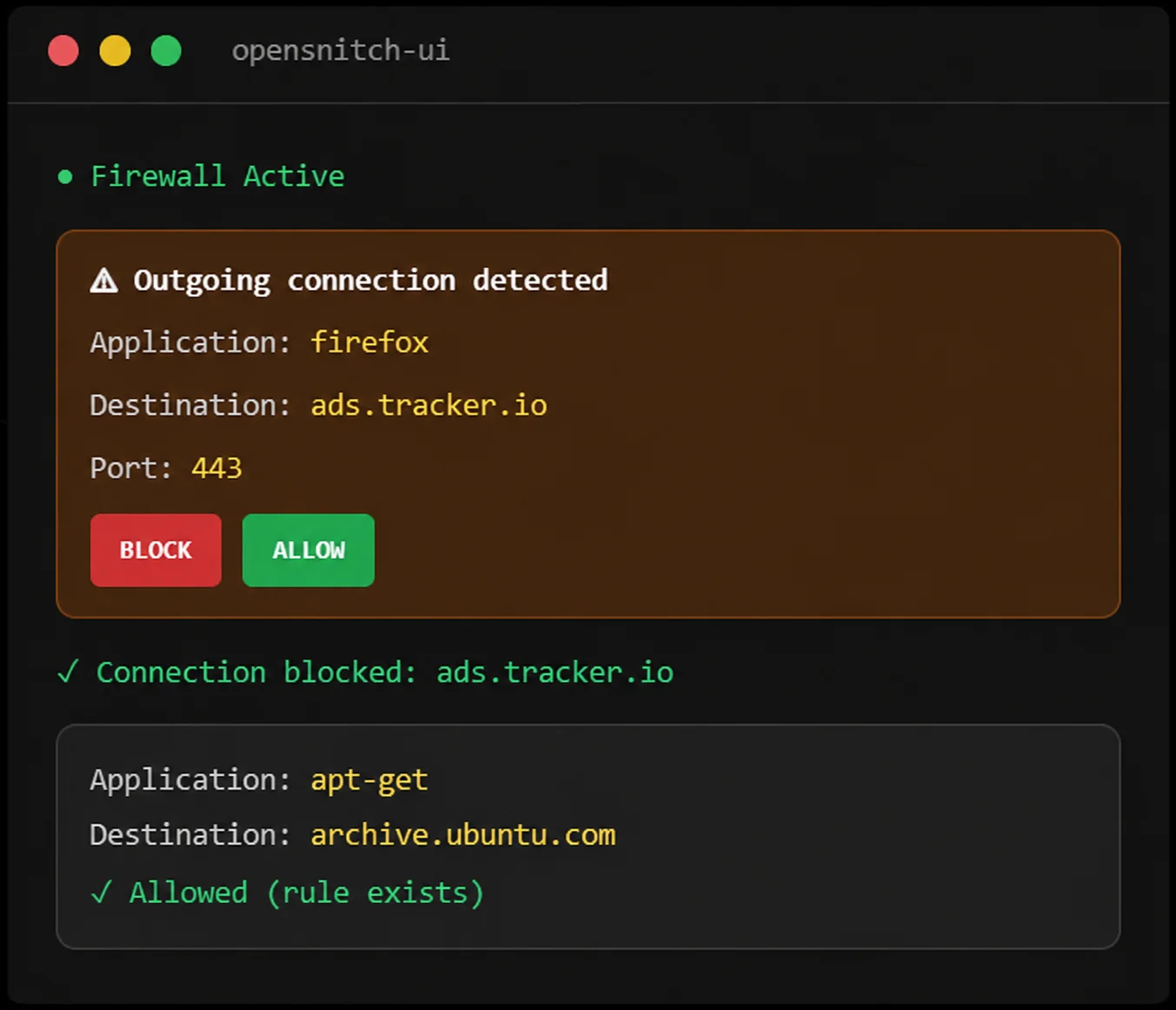
- About OpenSnitch
What is OpenSnitch?
OpenSnitch is a powerful open-source application firewall designed for GNU/Linux systems that gives users complete control over outgoing network connections. Inspired by Little Snitch for macOS, it monitors applications attempting to access the internet and allows you to decide whether to allow or block each connection through interactive alerts and customizable security rules.
Unlike traditional firewalls that focus primarily on incoming traffic, OpenSnitch provides detailed visibility into outbound communications, helping users identify unwanted connections, block trackers and telemetry, and protect sensitive data from being transmitted without permission. With its intuitive graphical interface, real-time monitoring capabilities, and advanced rule management system, OpenSnitch makes network security more transparent, accessible, and effective for Linux users of all experience levels.
Real-Time Monitoring
Watch every outgoing connection from every application on your Linux system as it happens. Stay informed with complete visibility.
Per-App Rules
Create granular firewall policies for individual applications. Allow or block connections by host, port, protocol, or user.
Fully Open Source
Licensed under GPLv3 with completely transparent code. No hidden tracking, no backdoors, and fully auditable security.
- Key Features
Powerful Features for Total Network Control
Discover the powerful tools that make OpenSnitch one of the most trusted application firewalls for Linux. From real-time connection monitoring to advanced rule management, OpenSnitch helps you take complete control of your network security and privacy.
Interactive Outbound Filtering
Monitor and control outgoing network connections as they happen. OpenSnitch displays real-time alerts whenever an application attempts to access the internet, allowing you to approve or deny connections based on your security preferences.
Privacy Protection
Protect your personal data from unwanted tracking and monitoring. OpenSnitch helps block telemetry services, advertising networks, trackers, and hidden background connections that may collect or transmit information without your knowledge.
Smart Rule Management
Create flexible firewall rules tailored to your needs. Easily configure permanent or temporary allow and block rules for specific applications, domains, IP addresses, ports, or connection types through an intuitive interface.
nftables Integration
Take advantage of modern Linux firewall technology with built-in nftables support. OpenSnitch provides a convenient graphical interface for managing firewall configurations without requiring complex command-line operations.
Real-Time Monitoring
Gain complete visibility into network activity through a centralized dashboard. Track active connections, monitor domains, view destination IP addresses, inspect ports, and analyze application behavior in real time.
Open-Source Security
Benefit from a transparent and community-driven security solution. As a fully open-source project, OpenSnitch allows users and developers to review the code, contribute improvements, and ensure a trustworthy firewall experience.
- Workflow
How OpenSnitch Works
OpenSnitch makes network security simple by giving you complete visibility and control over every outbound connection. Its interactive monitoring system detects network activity in real time, allowing you to decide which applications can communicate online and which should be blocked.
Detect Connection Attempts
OpenSnitch continuously monitors outbound network traffic across your system. Whenever an application attempts to establish an internet connection, the firewall instantly detects the request and collects key connection details.
Display Interactive Alerts
Real-time notifications appear whenever an unknown or unmanaged connection is detected, helping you review connection details before any data is exchanged.
Allow or Block Access
Allow or deny connections with a single click and create custom rules for applications, domains, IP addresses, ports, and connection types.
Monitor Activity
Review logs, inspect active processes, monitor statistics, and analyze network behavior through a centralized monitoring dashboard.
- Live Demo
See OpenSnitch In Action
Click the buttons below to simulate how OpenSnitch alerts you when applications try to make outgoing connections.
Connection Allowed
The selected application has been granted internet access. Future requests from this application will follow the saved rule automatically.
Connection Blocked
The outgoing connection has been denied. OpenSnitch will continue monitoring future network requests for additional protection.
- Why Choose
Why Choose OpenSnitch?
OpenSnitch combines powerful security features with an intuitive user experience, making it an excellent choice for Linux users who want greater visibility, privacy, and control over network activity. Whether you are a casual user, developer, or security professional, OpenSnitch provides the tools needed to protect your system from unwanted connections.
Full Control Over Internet Access
Take complete control over how applications interact with the internet. OpenSnitch allows you to decide which programs can establish network connections, helping prevent unauthorized communication and ensuring that your data remains under your control.
Easy-to-Use Interface
Manage network security through a clean and intuitive dashboard. Designed for both beginners and advanced users, OpenSnitch simplifies firewall management by providing clear alerts, straightforward controls, and easy-to-understand connection details.
Lightweight Performance
Enjoy robust security without sacrificing system performance. OpenSnitch is optimized to operate efficiently in the background, consuming minimal system resources while continuously monitoring outbound network activity.
Advanced Security Layer
Strengthen your system's defenses with proactive network monitoring. By detecting and alerting you to suspicious outbound traffic, OpenSnitch helps identify potential threats, unwanted data transmissions, and unusual application behavior before they become serious security risks.
- Benefits
System Protection Benefits
OpenSnitch helps strengthen your system’s security and privacy by providing detailed visibility into network activity and complete control over outbound connections. Its proactive monitoring capabilities help prevent unauthorized communications, reduce tracking, and improve overall system protection.
Stop Hidden Telemetry
Many applications transmit background data without clearly informing users. OpenSnitch helps identify and control these connections, allowing you to prevent unnecessary telemetry, analytics, and data-sharing activities that may affect your privacy.
Block Malware Domains
Protect your system from potentially harmful network communications. OpenSnitch enables you to detect and block connections to suspicious domains, helping reduce the risk of malware, unauthorized data transfers, and other security threats.
Improve Privacy
Take greater control of your personal information by limiting unwanted online tracking. By monitoring outbound traffic and blocking unnecessary connections, OpenSnitch helps reduce data collection and enhances your overall digital privacy.
Secure Development Environments
Gain deeper insight into application behavior during development, testing, and deployment. OpenSnitch allows developers and IT professionals to monitor network activity, verify software communications, and identify unexpected connections before software reaches production environments.
- By Numbers
OpenSnitch by the Numbers
OpenSnitch combines powerful security features with an intuitive user experience, making it an excellent choice for Linux users who want greater visibility, privacy, and control over network activity. Whether you are a casual user, developer, or security professional, OpenSnitch provides the tools needed to protect your system from unwanted connections.
Thousands of Linux Users
OpenSnitch is trusted by a growing community of Linux enthusiasts, developers, and security-focused professionals who depend on its interactive firewall capabilities to monitor and manage internet connections with confidence.
Open-Source Community Support
Backed by an active open-source community, OpenSnitch benefits from continuous improvements, transparency, and collaborative development that help keep the software secure, reliable, and up to date.
Real-Time Network Monitoring
OpenSnitch continuously monitors outbound network activity, providing instant visibility into application behavior. Users can track connections, analyze traffic, and make informed security decisions in real time.
Cross-Distribution Compatibility
Designed for a wide range of GNU/Linux distributions, OpenSnitch delivers a consistent firewall experience across Ubuntu, Debian, Fedora, Arch Linux, Linux Mint, and many other compatible environments.
- Supported
Supported Linux Distributions
OpenSnitch is designed to provide seamless firewall protection across a wide variety of Linux environments. Its compatibility with major distributions ensures that users can enjoy the same interactive network monitoring and privacy controls regardless of their preferred system.
Ubuntu
Fully supported with easy installation, graphical management tools, and seamless integration for everyday Linux users.
Debian
Stable integration for both desktop and server environments, providing reliable outbound connection monitoring.
Fedora
Optimized for modern Fedora releases with advanced monitoring capabilities and responsive firewall controls.
Arch Linux
Lightweight and highly flexible deployment, making it an excellent choice for experienced Linux users.
Linux Mint
User-friendly installation process combined with straightforward firewall management and monitoring tools.
Other GNU/Linux Distributions
OpenSnitch supports most modern Linux systems, delivering cross-distribution compatibility and consistent security features.
- Installation
Install in Under 2 Minutes
Getting started with OpenSnitch is quick and straightforward. The software can be installed on most major Linux distributions using package managers, distribution repositories, or downloadable release packages. Whether you are a beginner or an experienced Linux user, the installation process is designed to be simple, allowing you to start monitoring and controlling network connections within minutes.
Download for Linux
Access the latest OpenSnitch release and install it on your preferred Linux distribution using the recommended installation package.
Installation Guide
Follow step-by-step instructions to properly install, configure, and set up OpenSnitch for optimal security and network monitoring.
GitHub Repository
Explore the source code, development updates, release notes, and community contributions through the official OpenSnitch project repository.
- Pros & Cons
Honest Assessment
Every tool has strengths and limitations. Here’s a transparent look at OpenSnitch.
Pros
- Completely free and open-source under GPLv3
- Real-time per-application connection monitoring
- Granular rule creation with multiple criteria
- System-wide ad and tracker blocking
- Intuitive GUI plus full CLI support
- Low resource usage with eBPF/Netfilter
- Active community and regular updates
Cons
- Linux only — no macOS or Windows support
- Initial alert fatigue with many pop-ups
- Requires root access for installation
- Still in beta — not production-stable
- GUI can be resource-heavy on older systems
- Limited documentation for advanced configurations
- Some Wayland compatibility issues
- Requirements
System Requirements
OpenSnitch is designed to run efficiently on modern Linux systems without requiring high-end hardware. Its lightweight architecture ensures reliable network monitoring and firewall protection while maintaining excellent system performance.
Minimum
Recommended
- Comparison
OpenSnitch vs Alternatives
Choosing the right firewall and network monitoring tool depends on your security requirements, level of control, and preferred workflow.
| Feature | OpenSnitch | Little Snitch | UFW | iptables |
|---|---|---|---|---|
| Platform | Linux | macOS | Linux | Linux |
| Interactive Alerts | ✓ | ✓ | ✕ | ✕ |
| Per-App Rules | ✓ | ✓ | ✕ | Limited |
| GUI Dashboard | ✓ | ✓ | ✕ | ✕ |
| Open Source | ✓ | ✕ ($59) | ✓ | ✓ |
| Network Visualization | ✓ | ✓ | ✕ | ✕ |
- Reviews
What Users Say
Discover why Linux users, developers, and security professionals trust OpenSnitch for monitoring network activity and managing outbound connections. From enhanced privacy to greater visibility into application behavior, OpenSnitch continues to earn positive feedback from users across different Linux distributions.
"OpenSnitch is exactly what Linux needed. I discovered so many apps phoning home without my knowledge. Now I have complete control over every connection."
Alex K.
Security Engineer"Switched from Little Snitch on Mac and OpenSnitch is nearly on par. The GUI is clean, the rules are easy to manage, and it's completely free. Amazing work!"
Sarah M.
Privacy Advocate"I use it on my home server to monitor outgoing traffic. The CLI works great for headless setups. Only wish the documentation was a bit more comprehensive."
David P.
Linux Sysadmin- FAQ
Frequently Asked Questions
Find answers to common questions about OpenSnitch, including installation, features, compatibility, privacy protection, firewall management, and security.
General Questions
What is OpenSnitch?
OpenSnitch is an open-source application firewall for Linux that monitors and controls outbound network connections.
Is OpenSnitch free to use?
Yes, OpenSnitch is completely free and open-source software available to all Linux users.
What does OpenSnitch do?
It monitors outgoing internet connections and allows users to create rules that permit or block network access.
Who should use OpenSnitch?
OpenSnitch is suitable for Linux users, developers, system administrators, and anyone concerned about privacy and security.
Is OpenSnitch similar to Little Snitch?
Yes, OpenSnitch is inspired by Little Snitch and provides similar outbound connection monitoring for Linux systems.
Installation & Compatibility
Which Linux distributions support OpenSnitch?
OpenSnitch supports Ubuntu, Debian, Fedora, Arch Linux, Linux Mint, and many other GNU/Linux distributions.
Does OpenSnitch require a graphical desktop environment?
The graphical interface works best on desktop environments, although the daemon can run independently.
Is OpenSnitch difficult to install?
No, installation is straightforward and can usually be completed using distribution packages or release files.
Can I use OpenSnitch on older Linux systems?
Compatibility depends on your distribution version, but most modern Linux systems are supported.
Does OpenSnitch work with nftables?
Yes, OpenSnitch integrates with nftables and can help manage firewall configurations through its interface.
Features & Functionality
How does OpenSnitch detect network connections?
It continuously monitors outbound traffic and alerts users when applications attempt to access the internet.
Can OpenSnitch block specific applications?
Yes, users can create rules to allow or block internet access for individual applications.
Can I create permanent firewall rules?
Yes, OpenSnitch supports both temporary and permanent rules for connection management.
Does OpenSnitch monitor active connections in real time?
Yes, the dashboard displays active connections, domains, ports, IP addresses, and related processes.
Can OpenSnitch block trackers and telemetry?
Yes, it can help block telemetry services, trackers, and unwanted background network communications.
Security & Privacy
How does OpenSnitch improve privacy?
It allows users to identify and block unnecessary outbound connections that may collect or transmit data.
Can OpenSnitch help detect suspicious activity?
Yes, unusual or unexpected connection attempts can be identified through real-time monitoring and alerts.
Does OpenSnitch protect against malware?
While it is not an antivirus solution, it can help block suspicious outbound communications associated with malicious software.
Is OpenSnitch safe to use?
Yes, OpenSnitch is open-source software that is reviewed and improved by the community.
Why should I choose OpenSnitch over traditional firewalls?
OpenSnitch offers interactive alerts, application-level control, real-time monitoring, and a user-friendly interface that many traditional firewalls do not provide.
OpenSnitch – Open Source Firewall for Privacy & Security

OpenSnitch is an advanced outbound firewall for Linux that provides real-time network monitoring, customizable rules, and detailed connection management.
Price: Free
Price Currency: $
Operating System: Linux
Application Category: Software
4.8